Automating adding hosts with active agent autoregistration
In this chapter, we'll explore the powerful automation features in Zabbix called active agent autoregistration. This tools are essential for scaling your monitoring efforts by minimizing manual configuration and ensuring new devices and services are seamlessly integrated into your Zabbix environment.
We'll dive into active agent autoregistration, which simplifies the management of Zabbix agents, especially in large or rapidly changing environments. We'll cover how to set up autoregistration rules that allow agents to register themselves with the Zabbix server, reducing administrative overhead and ensuring all relevant data is captured efficiently.
By the end of this chapter, you'll have a thorough understanding of how to leverage active agent autoregistration to create a more automated, scalable, and efficient monitoring system.
Understanding active agent autoregistration
Before we start configuring anything, it is important to understand what autoregistration actually does.
Normally, when we want to monitor a new server with a Zabbix agent, we must first:
- Create a host in Zabbix
- Configure host interfaces
- Assign templates
- Place the host into the correct host groups
Only after those steps have been completed, the host can start sending monitoring data.
With active agent autoregistration, the workflow is reversed.
Instead of creating the host first, we deploy the Zabbix agent and configure it to connect to the Zabbix server. The agent then contacts the server and introduces itself as a new monitoring target.
The Zabbix server receives this registration request and evaluates it against configured autoregistration actions. If the registration matches the action conditions, Zabbix can automatically create and configure the host.
The result is a highly scalable onboarding process that requires little or no manual work.
Active versus passive agents
Autoregistration only works with active checks. For passive agents we have another feature in Zabbix called network discovery, discussed in another part of this book.
The reason we can only use this feature with active agents is because the agent must initiate communication towards the Zabbix server or proxy. A passive agent waits for the server or proxy to contact it, while an active agent establishes the connection itself.
Let's open the Zabbix agent configuration file.
For active checks, the following configuration parameters are especially important.
With those settings, we can already start doing active agent autoregistration. However we can include an additional parameter to make things more useful.
The key parameter here is HostMetadata. It functions as a text string sent during
registration and can be used by autoregistration actions to determine how a host
should be configured.
For example:
Or:
Or even:
This allows us to create different autoregistration actions for different types of systems. Additionally if you combine this type of configuration with automatic installation of the Zabbix agent through Ansible, PDQ Deploy or other tools we get a very versatile hands-off environment.
After setting up your agent configuration, do not forget to restart the agent for the changes to take effect.
Creating an autoregistration action
Let's configure our first autoregistration action.
Navigate to Alerts | Actions | Autoregistration actions
Click on Create action and give the action a name. For example Linux servers
autoregistration.
Now create a condition. Let's use the HostMetadata item we configured in our
Zabbix agent configuration file earlier. Let's set the Condition as Host metadata
with the operator contains and the value Linux.
This means the action will only execute when a registering agent sends metadata
containing the word linux.
With the condition set, we can now configure what needs to happen upon matching
the conditions. We do this using the Operations.
When a host registers successfully, we can automatically perform actions such as:
- Add host to a host group
- Link templates
- Add host tags
Since every host needs at least one host group, Zabbix will automatically add
the Discovered hosts host group. However, that is usually not enough for a
structured Zabbix environment. As such we will add the host to a host group
called Servers/Linux
This keeps our environment organized from the moment the host appears.
We can also automatically assign templates, which is where the HostMetadata
really starts to shine. For example we can now attach the Linux by Zabbix agent
active template to the host, automatically once the host registers itself. This
will make sure any new hosts we install the agent on will automatically start
monitoring, by collecting metrics from the linked template and even creating
problems. No manual template assignment is required, but we can still add more
manually later.
Our Action conditions should now look something like below.
![Zabbix Agent autoregistration action conditions]](autoregistration/ch10.x-autoregistration-action-conditions.png){ align=center }
10.x Zabbix Agent autoregistration action conditions
The operations should contain the following.
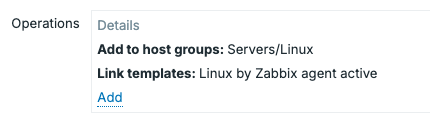
_10.8 Zabbix Agent autoregistration action operations
One of my favourite tricks here is to let a tool like Ansible set the HostMetadata
field with software like NGINX automatically. Then we can add additional Actions
with rules to add those templates as well. These can be done in separate actions,
as an incoming host registering itself will create an autoregistration event. In
Zabbix, any event coming in will always be matches against all action conditions
and execute the operations for all matches.

10.9 Zabbix Agent autoregistration action list
Using HostMetadataItem
Instead of using hardcoding metadata, the Zabbix agent can also generate it dynamically.
For example, in the configuration file of the Zabbix agent we could add the following parameter.
The agent will execute the item with the key system.uname and use its value as
metadata.
This can be useful when building automated deployment systems where you want hosts to classify themselves automatically.
Using global PSK authentication
In many environments, allowing any agent to register itself based solely on host metadata may not be considered secure enough. To provide an additional layer of protection, Zabbix supports TLS encryption with Pre-Shared Keys (PSK) for autoregistering agents.
As such, it is recommended to configure all newly deployed agents with the same global PSK. This ensures that only systems that possess the correct key can successfully communicate with the Zabbix server or proxy.
On the agent, configure the PSK settings.
Then, make sure the PSK file is configured and ready to use.
openssl rand -hex 32 > /etc/zabbix/agent.psk
chmod 400 /etc/zabbix/agent.psk
chown zabbix:zabbix /etc/zabbix/agent.psk
When configuring the autoregistration action, you can define the PSK identity and PSK value that should be assigned to newly registered hosts. Any agent that attempts to register without the correct PSK will be rejected before the autoregistration process is evaluated.
This approach is especially useful in automated deployment environments where servers are provisioned from templates or configuration management systems such as Ansible, PDQ Deploy or other tools.
Note
Using a single global PSK simplifies deployment and onboarding, but it also means every autoregistering host shares the same secret. In higher-security environments, consider automatically rotating to unique host-specific PSKs after registration.
Security considerations
Autoregistration is extremely convenient, but it should be configured carefully.
Remember that any system capable of reaching your Zabbix server or proxy could potentially attempt registration.
A few good practices include:
- Use meaningful metadata conditions.
- Only allow trusted networks to reach your agents and proxies.
- Use PSK encryption between agents and server/proxy.
- Avoid creating overly broad autoregistration actions.
- Regularly review newly registered hosts.
Automation should reduce the administrative load, without impacting security.
Conclusion
Active agent autoregistration is one of the most useful automation features in Zabbix. Instead of manually creating hosts and assigning configuration, agents can register themselves to the monitoring environment and receive everything they need automatically.
By combining active checks, host metadata, PSK authentication, and autoregistration actions, you can build a highly scalable agent deployment process that works equally well for a handful of servers or thousands of systems across multiple locations.
When designed properly, autoregistration ensures that newly deployed systems are monitored immediately, consistently, securely, and with minimal administrative load.
Questions
- What is Active Agent Autoregistration in Zabbix, and how does it work?
- Which parameters do you need to configure in the zabbix_agent2.conf (or zabbix_agentd.conf) to enable autoregistration?
- What security considerations should you keep in mind when using autoregistration (especially in production)?